2026-09-13
Proxelar 0.6.0 is out.
A server sends two cookies. There is another header between them. You open the response in your proxy, and the cookies have moved next to each other and all the names are lowercase. The request still works. But now you have to wonder which details came from the server and which came from the tool you are using to inspect it.
That is the problem behind most of this release. Proxelar now keeps HTTP headers as an ordered list, with repeated fields, original HTTP/1 casing, and values that don't have to be valid UTF-8. The same representation goes through capture, editing, Lua, replay, and session files.
HTTP/2 upstream forwarding and HTTP/3 interception also landed. I'll get to those, including where H3 actually works. First, here is a small example you can run locally.
These are three separate response fields:
Set-Cookie: session=demo; Path=/; HttpOnly
X-Backend: checkout
set-cookie: currency=EUR; Path=/
A dictionary with one value per case-insensitive header name cannot represent repeated fields. A multi-value map can, but it can still lose the fact that X-Backend was between the cookies, or that the second cookie field used a different spelling.
HTTP field names are case-insensitive, and the order of fields with different names generally has no semantic significance. RFC 9110 makes that distinction. Preserving those details is useful when comparing captures or building an editor, even when changing them would not break the request. Set-Cookie also needs separate treatment: joining several cookies into one comma-separated field is not a safe substitute for keeping the original fields.
Issue #170 came from someone building an editable request representation on top of Proxelar. They needed to enumerate arbitrary fields in their original order. That is a reasonable thing to expect from a proxy library.
This could not be fixed in the GUI alone. Once a map has discarded the original sequence, sorting its entries cannot recover it. I replaced the HTTP/1 parsing path with a native parser that keeps the fields in order, and introduced a shared HeaderBlock representation so the same details survive later edits and exports.
You'll need Proxelar 0.6.0 and Python 3. The release page has prebuilt binaries if you don't want to build the native dependencies yourself. Check proxelar --version before starting.
Save this as server.py:
import json
from http.server import BaseHTTPRequestHandler, ThreadingHTTPServer

class Handler(BaseHTTPRequestHandler):
    protocol_version = "HTTP/1.1"

    def do_GET(self):
        body = json.dumps({"user": "demo", "cart_items": 2, "currency": "EUR"}, indent=2).encode()
        self.send_response(200)
        self.send_header("Content-Type", "application/json")
        self.send_header("Set-Cookie", "session=demo; Path=/; HttpOnly")
        self.send_header("X-Backend", "checkout")
        self.send_header("set-cookie", "currency=EUR; Path=/")
        self.send_header("Content-Length", str(len(body)))
        self.end_headers()
        self.wfile.write(body)

ThreadingHTTPServer(("127.0.0.1", 9090), Handler).serve_forever()
Run it in one terminal:
python3 server.pyStart Proxelar in another:
proxelar -i guiThen send a request from a third terminal:
curl --noproxy '' --http1.1 \
  --proxy http://127.0.0.1:8080 \
  -i http://127.0.0.1:9090/cart
The empty --noproxy argument matters. Without it, a NO_PROXY environment variable can make curl skip the proxy for localhost, and you'll wonder why the request never appears in the GUI.
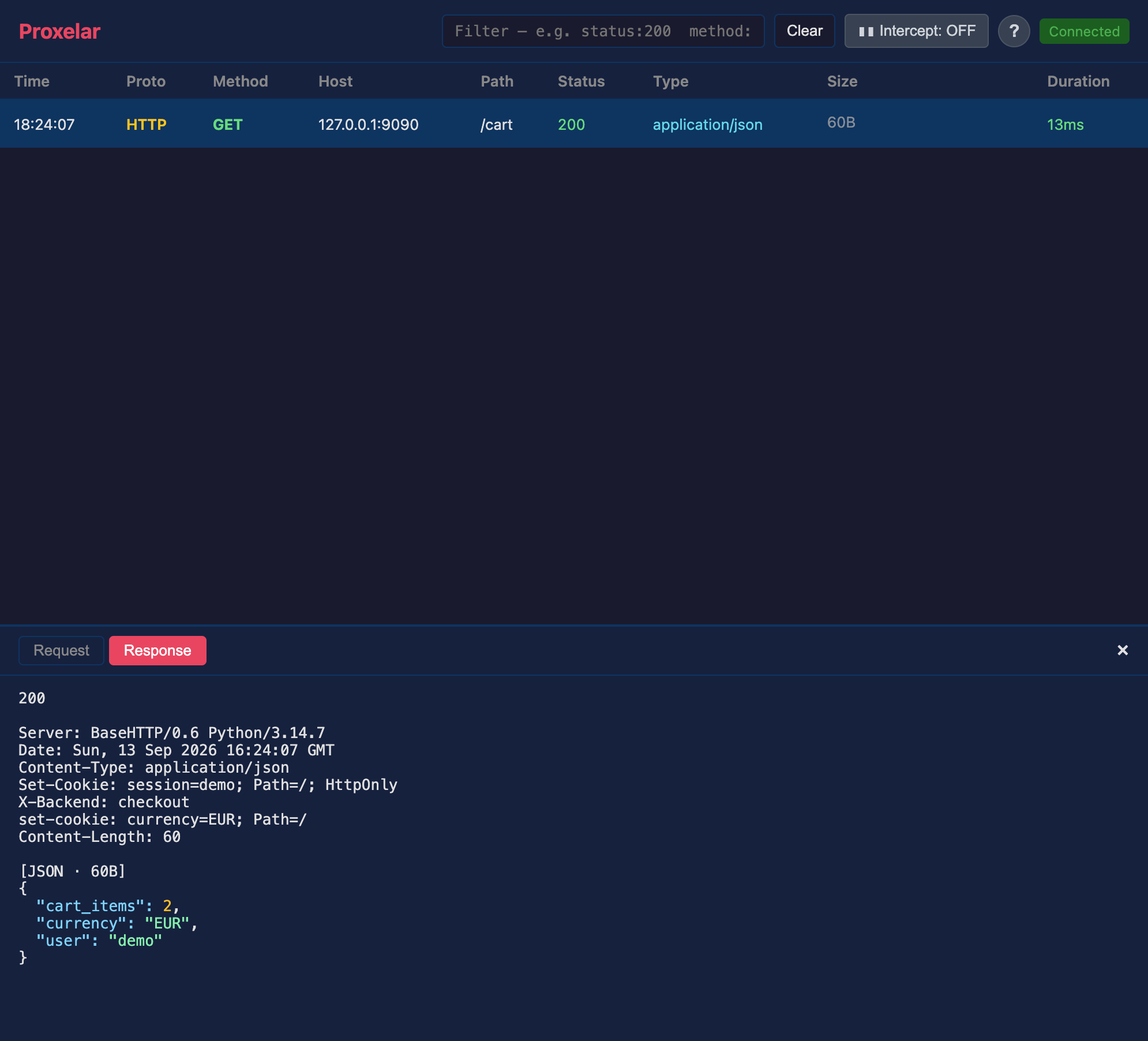
Click /cart in the web interface, then Response. Both cookies are there, with X-Backend still between them. The casing is preserved too. The screenshot below is from this example running against the released binary.
This is still a parsed HTTP capture. Proxelar handles message framing and connection headers when forwarding, so it is not a byte-for-byte recording of the TCP stream. For example, the outgoing Content-Length field can be regenerated. Keeping application fields intact does not mean forwarding every wire detail unchanged.
The same distinction matters when a script edits the response. If you want to add a UI preference cookie while keeping the backend's session and currency cookies, save this as add-cookie.lua:
function on_response(request, response)
    if request.url ~= "http://127.0.0.1:9090/cart" then return end

    response.headers:add("Set-Cookie", "theme=dark; Path=/")
    return response
end
Stop Proxelar with Ctrl+C, then restart it with the script. Leave the Python server running.
proxelar -i gui --script add-cookie.luaRun the same curl command again. You now get three cookie fields: session, currency, and theme. The two fields from the backend are still present.
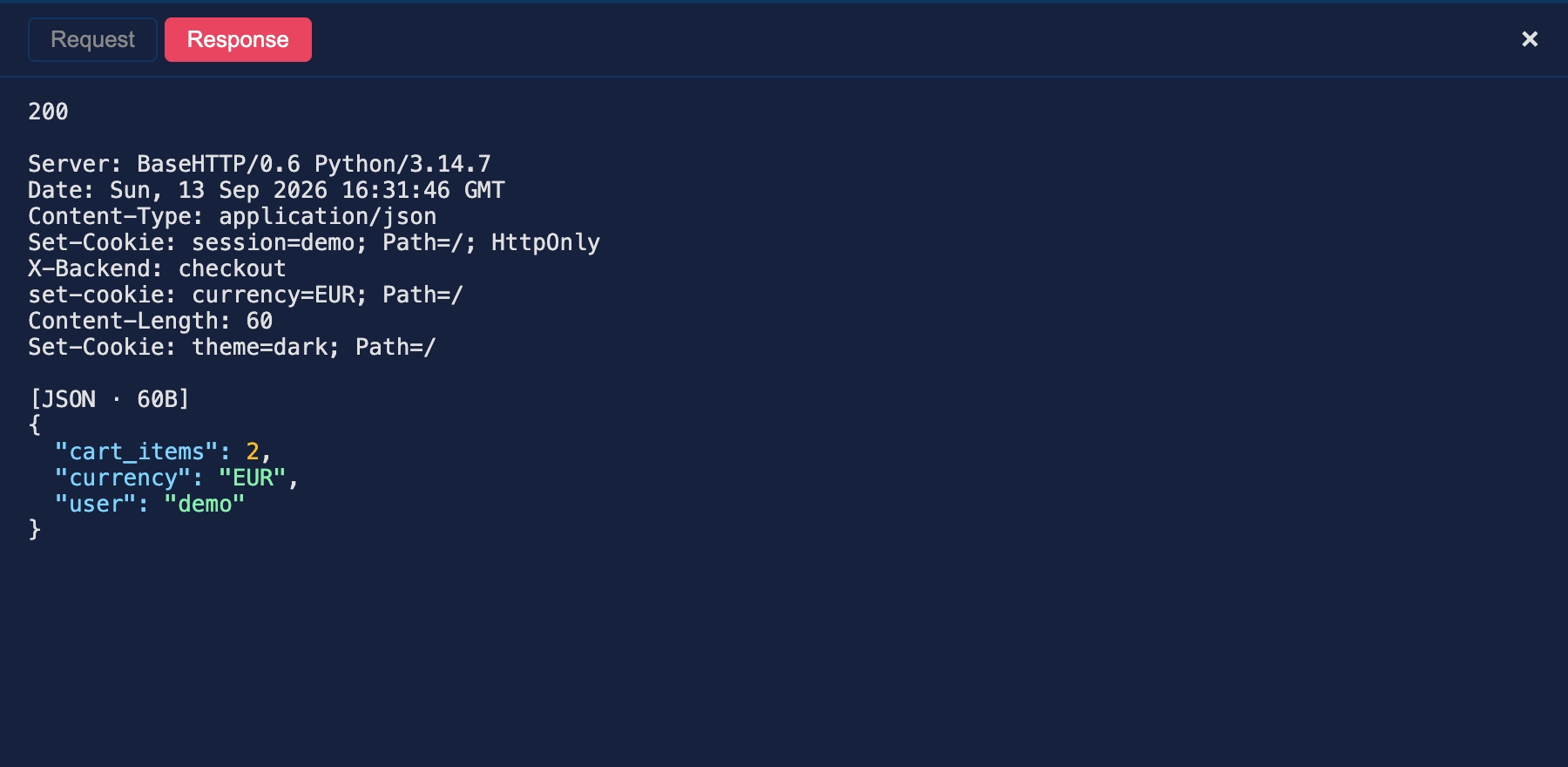
The choice of method is the important part:
get(name) reads the first value.get_all(name) reads every value for that name.add(name, value) appends a field.set(name, value) replaces all values for that name at its first position.remove(name) removes all matching fields.Lookups are case-insensitive. get_all("set-cookie") finds both Set-Cookie and set-cookie.
The old bracket syntax still works, but an assignment such as response.headers["Set-Cookie"] = "theme=dark; Path=/" behaves like set. It replaces the other cookies. Use add when you mean another field, and set when you mean a replacement.
To walk the whole header block, including duplicates, use:
for name, value in response.headers:iter() do
    print(name, value)
end
Put that inside on_response if you want to inspect the sequence from a script. The Lua API reference covers the rest. Script errors continue to log and pass traffic through.
Changing only the display would leave the same problem in saved captures and automation. The REST API now returns header lists:
[
  { "name": "Set-Cookie", "value": "session=demo; Path=/; HttpOnly" },
  { "name": "X-Backend", "value": "checkout" },
  { "name": "set-cookie", "value": "currency=EUR; Path=/" }
]
Values that cannot be represented as UTF-8 use value_base64 instead of value. If you consume the API, iterate these entries. Converting them straight back into a dictionary throws away the information the new representation keeps.
Native sessions are now version 2. Proxelar 0.6.0 rejects version 1 files. Changing the version number by hand will not convert the old header structure or recover information it never stored.
If you need the HTTP traffic from an older session, keep a 0.5.x binary and export HAR with that version first:
# Run with your 0.5.x binary, then press Ctrl+C to write the export.
proxelar -i terminal --load-session old.proxelar.json --export-har old.har
Then import it with 0.6.0:
proxelar -i terminal --import-har old.har --save-session imported.proxelar.jsonPress Ctrl+C again to write the new native session. Keep the original file: HAR is an HTTP interchange format, not a full migration of native WebSocket, TCP, DNS, and UDP data. The export also redacts common credentials by default. Use --export-secrets on the old export command only if you need those values in a private local capture.
The 0.5.0 post ended with two limitations: inspected HTTP/2 traffic was forwarded upstream as HTTP/1.1, and HTTP/3 wasn't intercepted. Both changed in 0.6.0.
TCP proxy modes can now use HTTP/2 end to end. There is one important header limitation: the h2 adapter preserves duplicate-value order, but it does not guarantee the original global order across different field names. HTTP/2 and HTTP/3 also require lowercase field names. The HTTP/1 casing example above is specifically an HTTP/1 example.
HTTP/3 is enabled in the official CLI builds for reverse proxy and WireGuard modes. An https:// reverse target enables TCP and UDP listeners on the same port; an http3:// target selects UDP-only H3 upstream. WireGuard mode can intercept QUIC traffic from the connected client. This does not make an ordinary HTTP forward proxy carry arbitrary HTTP/3 traffic.
The reverse proxy guide covers the hostname, certificate trust, and listener setup. Trusting the Proxelar CA is still necessary for TLS interception, and certificate-pinned clients still reject it.
Thanks to @byt3m4st3r for the optional justfile and dependency updates in #176, and for fixing multi-line body rendering in the TUI in #178. Pretty-printed JSON now gets actual separate rows instead of being collapsed into one wrapped row.
If you work on the repository, just --list shows the build, test, lint, packaging, and coverage recipes. They're wrappers around the documented Cargo commands, so installing just is optional.
The complete 0.6.0 changelog includes the connection, cancellation, and framing fixes that came with the protocol work. For a first test, use the little cookie server above. It gives you something concrete to inspect, change, and verify without pointing the proxy at a real account.