2026-10-27
Disclosure: this post was written with the assistance of an LLM, and so was most of Kanzo's code. The idea, the plan, the prompts and every decision below are mine. I have reviewed and edited everything, and all the numbers were measured, not estimated. The section on measuring explains how.
My coding agents and I used to share work through todo.md files, one per repo, edited by me, by Claude Code and by Codex. One of them grew past a hundred items, most of them done. A file like that works for one agent at a time. With several, nothing says which item someone is already working on, and the file doesn't tell you which laptop has the latest copy.
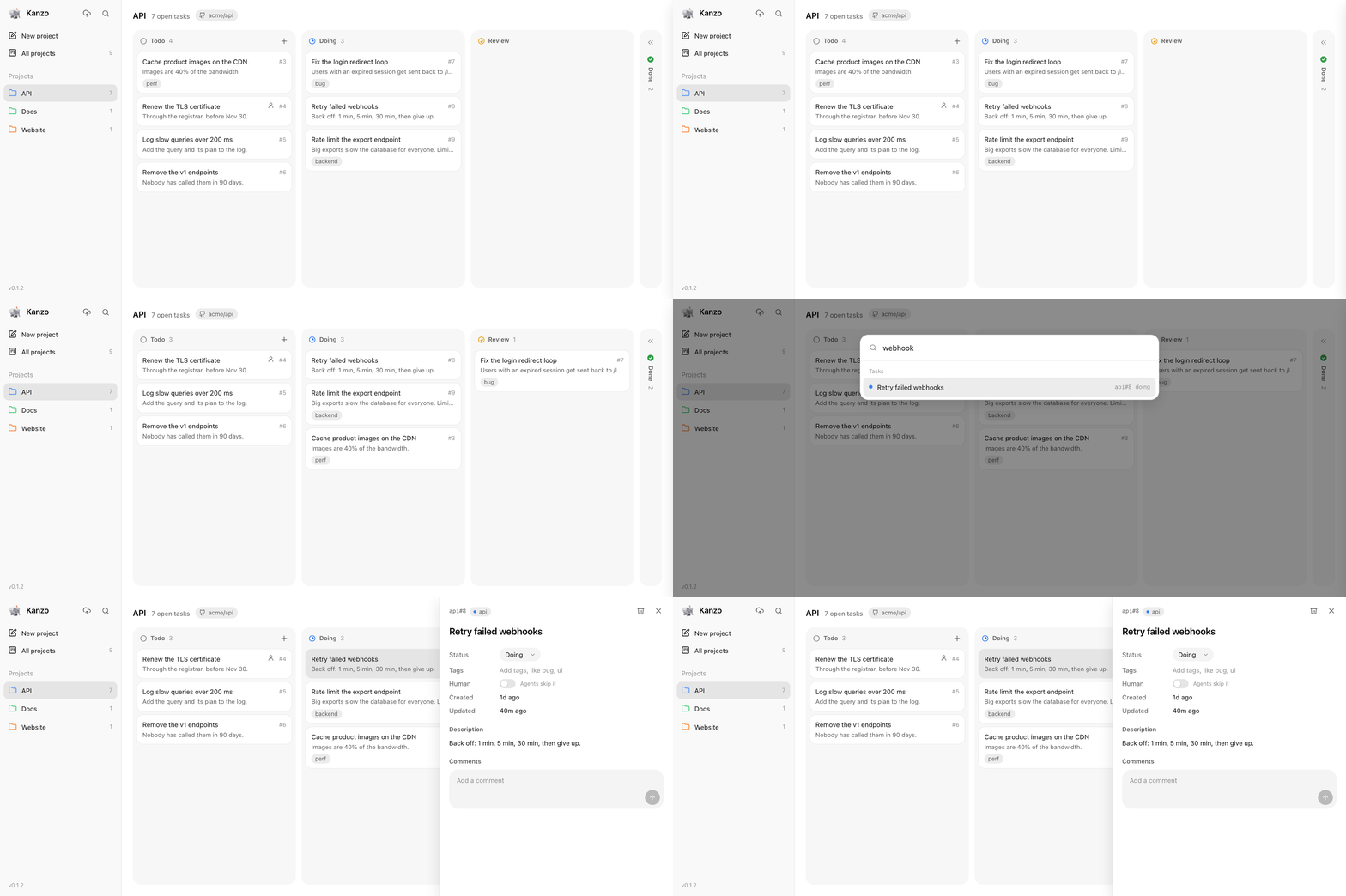
What I wanted was boring: a kanban board. Columns, cards, comments. Except that half of the people moving the cards are agents, and agents don't click. They call tools.
So I built Kanzo, a kanban board in the browser plus an MCP server, in one program. This post is about how it was built, in a handful of prompts over two days, and about the numbers: what it costs in memory, in a browser tab, in disk, and in the thing that matters most for agents, tokens. I'll also write down how I measured each one, because numbers without a method aren't worth much.
Before writing any prompt I wrote down what I wanted, as constraints rather than features:
There are good kanban tools out there, and there are task managers made for agents. I couldn't find one that met all five constraints at the time, which is why I ended up writing a plan instead of an install command.
This is the part people asked about the most, so I'll be precise. Kanzo went from nothing to a public v0.1.0 in about 28 hours, and most of the code was written by Claude Code. The interesting part is not that an agent wrote the code. It's how much of the result was decided before the first line was written.
In reality I started with a build plan, a document I wrote the way I'd write it for a colleague, and followed it with about twenty short prompts: "proceed with the next milestone", "make it lighter", "fix these two things", "prepare everything to go public". Below I've merged the plan and all of those prompts into the single prompt I'd write today to get the same v0.1.0. Nothing in it is new: every line is something I asked for at some point before publishing.
Build Kanzo: one small Rust program that serves a kanban board in the
browser and an MCP server for coding agents, with all data in one
portable folder. It is for one person and their agents.

Principles
- Minimal: projects, tasks, statuses, Markdown descriptions, comments.
- Fast and light: it must run on a very old computer or a Raspberry Pi.
  One binary of a few MB, SQLite built in, no runtime, no Docker, no
  build step for the web page. Measure memory, startup time and binary
  size, search for ways to reduce them, and keep what the measurements
  justify.
- MCP first: every action a person can do on the board, an agent can do
  through MCP. Tool replies are short plain text, never JSON, because
  every token stays in the agent's context.
- One board for all projects. A project is a short name, optionally
  linked to a GitHub repo (owner/repo). When an agent doesn't name a
  project, use the git remote of the folder it works in.
- Portable: everything lives in one folder (~/kanzo by default). Copy it
  to another machine and the board is there.
- Easy to maintain: few dependencies, the latest stable versions, plain
  SQL, no framework on the front end, idiomatic Rust.

Out of scope: users and logins, labels, due dates, notifications,
real-time collaboration between people, mobile apps.

Design
- One binary, two modes: `kanzo` serves the board on localhost:4242 and
  opens the browser; `kanzo mcp` speaks MCP over stdio. Both read and
  write the same SQLite file, safely at the same time.
- Crates: axum and tokio for the web server, rusqlite with SQLite
  bundled, rmcp (pinned) for MCP, clap for the CLI.
- Tables: projects, tasks (title, description, status, position),
  comments (author, body), and meta for the schema version.
- Columns: todo, doing, review, done by default, editable in config.toml.
  Tasks are written as project#id, like api#12.
- MCP tools: list_projects, create_project, list_tasks, get_task,
  create_task, update_task, add_comment, delete_task, and next_task,
  which takes the top todo task and moves it to doing. Two agents must
  never get the same task.
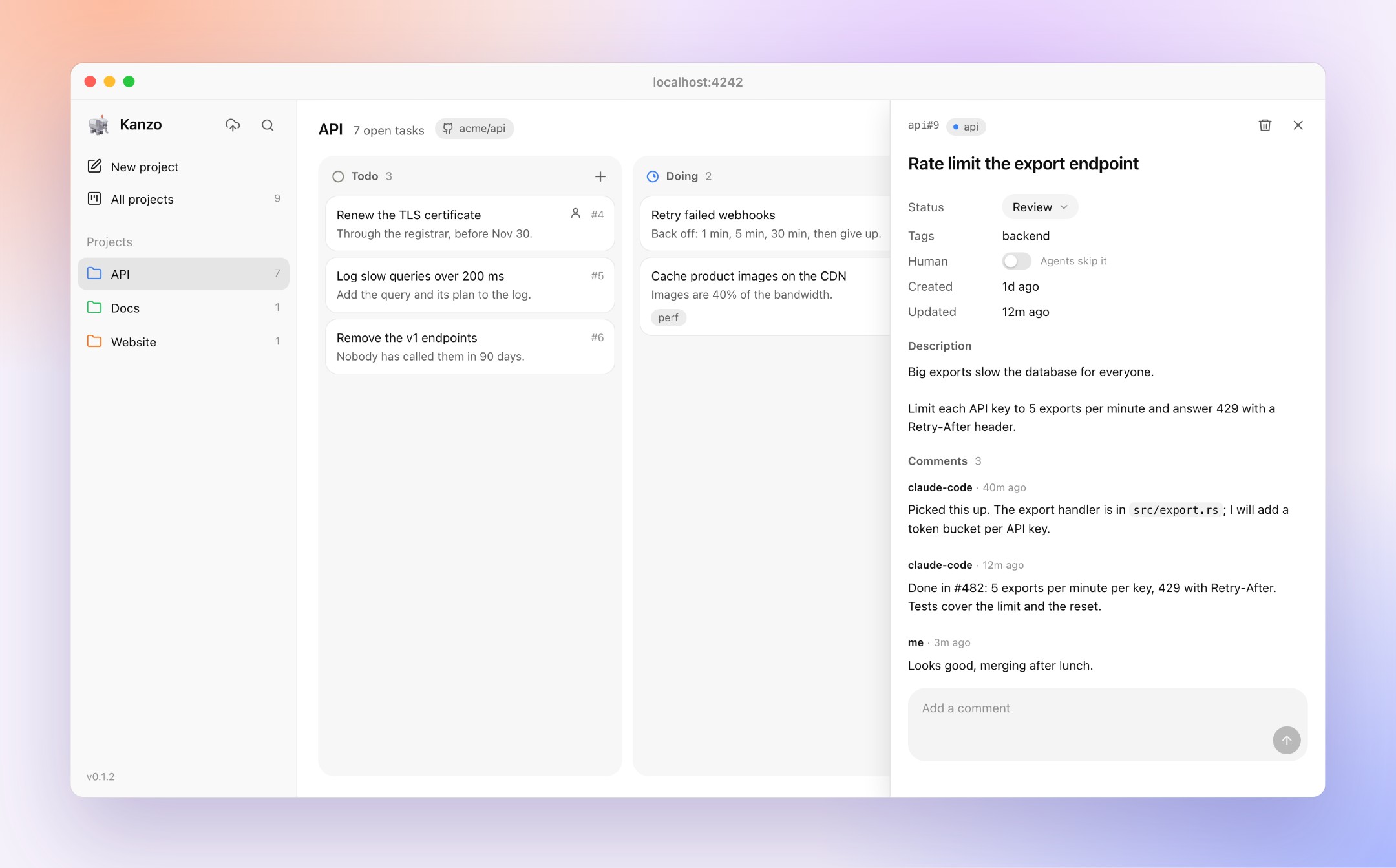
- The board: one embedded HTML file with plain JavaScript. A sidebar of
  projects, an "all projects" view, drag and drop between columns, a task
  panel for the description and comments, search, light and dark themes
  following the system. New tasks open with the cursor in the title.
  Deleting a project deletes everything in it. The page checks for
  changes every 2 seconds, so cards moved by agents appear on their own.

Commands
- kanzo init, kanzo export (Markdown or JSON), kanzo service install
  (start at login on macOS and Linux), and kanzo sync, which commits the
  folder to a private git repo and pushes or pulls it. A SQLite file
  can't be merged: if both machines changed the board, stop and ask
  which one to keep.
- Optional MCP over HTTP at /mcp for clients that can't start a program.

Release
- Build with cargo-dist for macOS and Linux, including ARM boards, with
  a one-line installer. No Homebrew for now.
- A short README that is easy to understand: what it is, how to install
  and connect agents, measured numbers for size, memory and speed, and
  screenshots. A modern logo: a 3D illustration of an armored elephant,
  minimal and a little funny, on a horizontal banner.
- License: AGPL-3.0. Small, atomic commits. Tag v0.1.0.

Work in milestones that each end in something usable, and test each one
for real before moving on.
A few things in it seemed to help, at least for me:
A word on the name. When I wrote the plan, "kanzo" was still free on crates.io, Homebrew, npm and PyPI, and the plan said to claim it early. The elephant came later, from the agent: when I asked for a logo it drew an elephant, and when I asked why, the answer was in the name. Zō (象) is Japanese for elephant, so Kanzo reads as kanban plus zō. I hadn't planned it, but I kept it, as an armored elephant.
Once v0.1.0 was public, I moved Kanzo's own todo list into Kanzo and asked the agents to work through it, in parallel where they could.
From that point the loop was the one I had built the tool for. I wrote cards on the board, agents took them with next_task, commented on what they did, and moved them to review. I read the comments, tried the change, and moved the card to done. Pasting images into tasks, "human" tasks that agents skip, and a sync button in the sidebar were all built that way, on the board they were being added to.
The whole design fits in one picture:
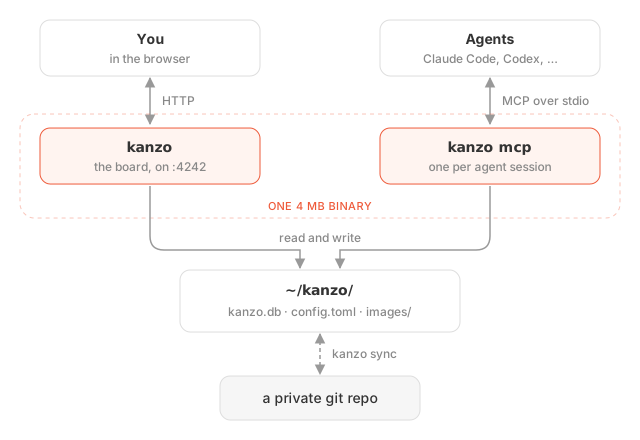
There's no daemon in the middle. The board and every agent open the same SQLite file. Each agent session starts its own kanzo mcp process over stdio, so with three agents running, four processes share one database. SQLite has handled that for twenty years.
The first version used SQLite in WAL mode, which is what everyone recommends for concurrent access. The resource review measured it and threw it out.
Kanzo opens a fresh connection for every operation and closes it right after. That sounds wasteful, but it's what makes sync safe. When kanzo sync replaces kanzo.db with the version from another machine, no process is left holding the old file. With WAL, every open has to set up the -wal and -shm files, and every close tears them down. Measured on my machine, an open plus a read took 273 µs in WAL mode and about 81 µs with a rollback journal. Writes went from 466 µs to about 300 µs. So Kanzo uses journal_mode = TRUNCATE:
//! The database uses a rollback journal (`journal_mode = TRUNCATE`), not WAL. With a
//! connection per operation, WAL would set up and tear down its `-wal` and `-shm` files
//! on every request; the rollback journal makes a read touch no extra files at all and
//! measured about 3x faster per operation. Writes queue on the busy timeout.
There was a worse reason too: an old connection to a replaced file can delete the WAL of the new file when it closes. That kind of bug only shows up on the one day you really needed your board.
When two agents ask for work at the same moment, they must not get the same card. This is how next_task makes sure of it (slightly shortened):
pub fn next_task(&self, project_id: Option<i64>) -> Result<Option<Task>> {
    let from = self.first_status();
    let to = &self.statuses[1];
    let id = self.write(|c| {   // BEGIN IMMEDIATE ... COMMIT
        let id: Option<i64> = c.query_row(
            "SELECT id FROM tasks WHERE status = ?1 AND human = 0 \
             AND (?2 IS NULL OR project_id = ?2) ORDER BY position LIMIT 1",
            params![from, project_id], |r| r.get(0)).optional()?;
        if let Some(id) = id {
            let position = Self::end_of_column(c, to, id)?;
            c.execute("UPDATE tasks SET status = ?1, position = ?2 ... WHERE id = ?3",
                      params![to, position, id])?;
        }
        Ok(id)
    })?;
    id.map(|id| self.get_task(id)).transpose()
}
BEGIN IMMEDIATE takes SQLite's write lock before reading anything. The second agent waits on the lock, up to five seconds, and by the time it reads, the first card is already in "doing", so it gets the next one. The lock is on the file, so this works across processes, which is exactly the case here.
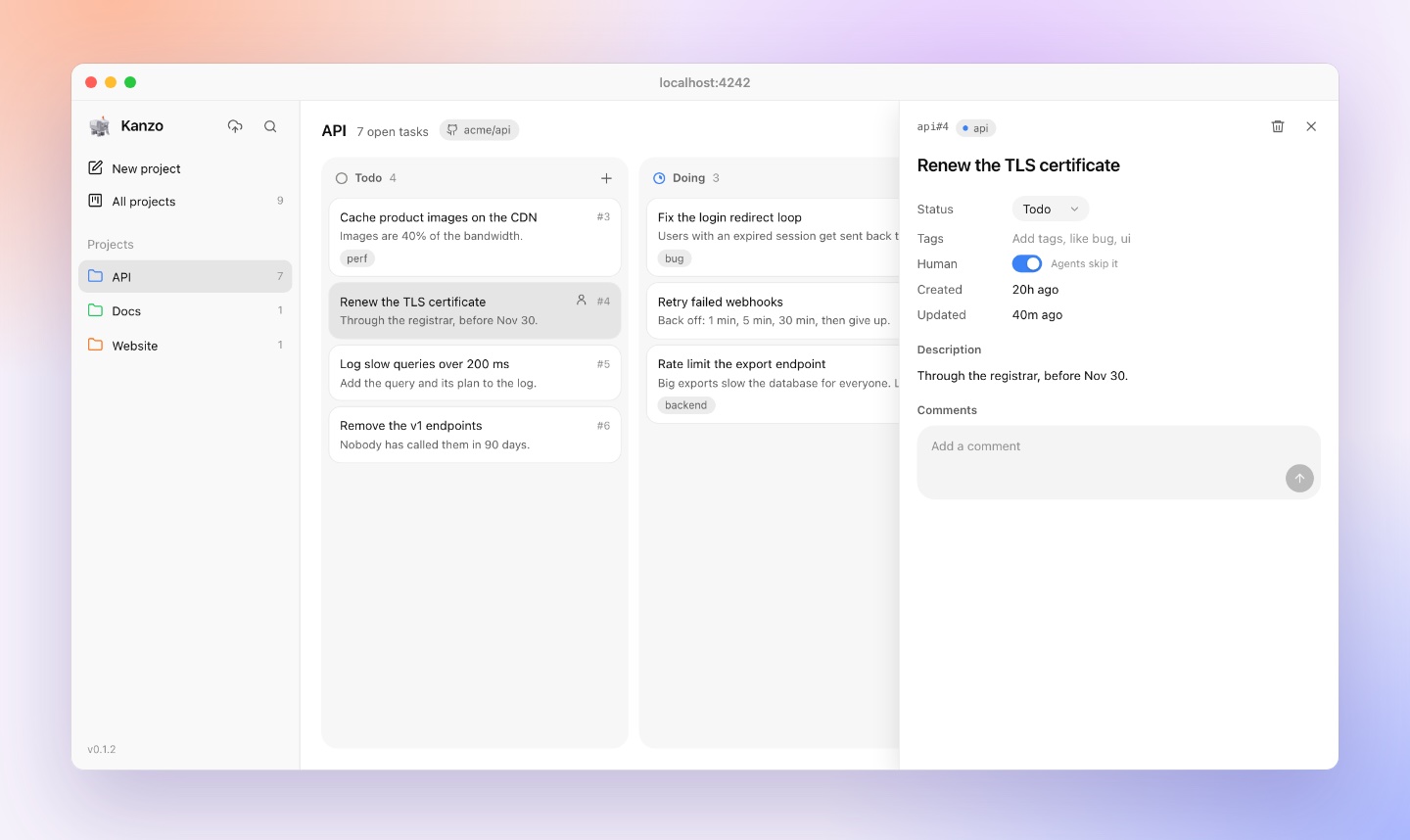
The human = 0 is the newest part. Some tasks are mine, like "renew the TLS certificate at the registrar", and an agent shouldn't pick them up just because they're on top. A switch on the card marks it as human, and next_task skips it.
The browser doesn't hold a WebSocket open. Every table has triggers that increment a single counter:
CREATE TRIGGER tasks_insert AFTER INSERT ON tasks
  BEGIN UPDATE meta SET value = value + 1 WHERE key = 'changes'; END;
CREATE TRIGGER tasks_update AFTER UPDATE ON tasks
  BEGIN UPDATE meta SET value = value + 1 WHERE key = 'changes'; END;
The page asks for that counter every two seconds, and reloads the board only when it moved. The answer is 25 bytes, and the poll doesn't run at all when the tab is hidden. Without the error handling:
async function poll() {
  if (document.hidden) return schedulePoll();
  const { changes } = await api("GET", "/changes");
  if (changes !== state.changes) { state.changes = changes; await loadBoard(); }
  schedulePoll();
}
This is less elegant than push and much easier to keep correct. When an agent moves a card you see it within two seconds, which is faster than you notice.
Agents never configure a project. When an agent calls a tool without one, kanzo mcp runs git remote -v in the folder the agent works in, puts origin first, and uses the first remote linked to a project. Worktrees and forks are where this kind of lookup usually breaks, so I tried both: a worktree whose only remotes were fork and upstream, no origin. The task landed in the right project, because Kanzo asks git instead of parsing .git itself, and git already knows how worktrees work.
The data folder is a git repo if you want it to be. Press the sync button, paste the URL of an empty private repo, and Kanzo runs git init, commits the board and pushes. On the next machine, do the same and Kanzo offers to use the board that's already there.
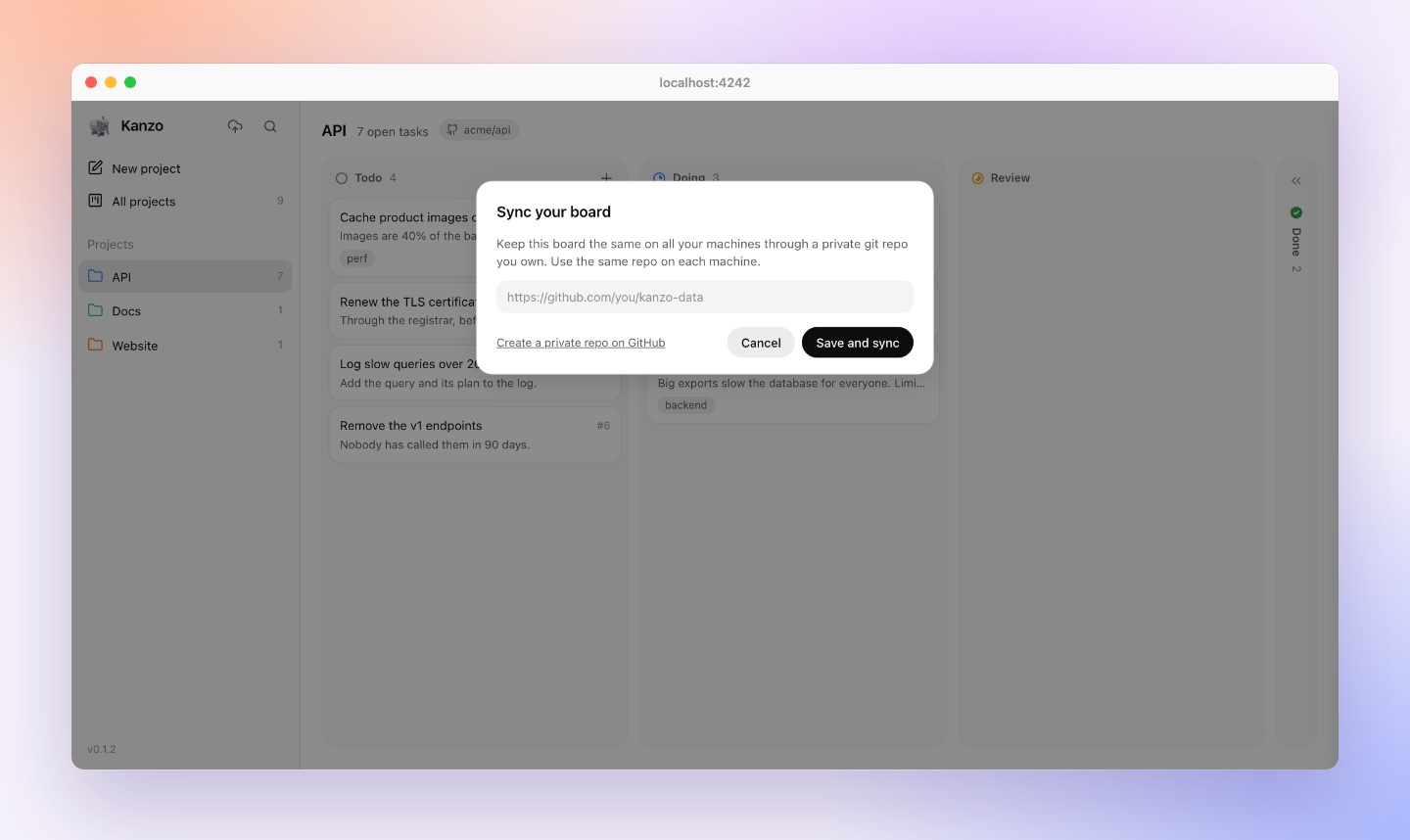
The risk from the plan is still there: a SQLite file can't be merged. If both machines changed the board since the last sync, Kanzo stops and asks which one to keep, --keep-local or --keep-remote. Taking the remote board keeps this machine's old one as kanzo.db.bak, and it's in git history too. That's fine for my use, one person switching between machines. There's a case the plan didn't cover: agents running on two machines at the same time each see their own board, so they can both start the same task, and choosing a side afterwards can't undo the duplicated work. Sync is for switching machines, not for parallel workers. For workers on several machines the answer is one board, with agents connecting over HTTP. I have an idea to make that nicer, but I haven't thought it through enough to build it.
Sync also taught me a lesson about schema versions. On day two I had a development build on one machine and the released version on another. The development build migrated the synced database to schema 6, and the released Kanzo refused to open it:
kanzo.db has schema version 6, newer than this kanzo supports (5)It was the right refusal and the wrong product. The migration had only added a column with a default, which older code can happily ignore. So the database now records two numbers: the schema version, and the oldest version that can still use it.
/// The oldest schema version whose Kanzo can still use a database at the latest one.
/// Adding a table or a column with a default leaves older versions working, so a board
/// synced from a newer Kanzo still opens in an older one. Raise it to the new version
/// only for a migration that older code can't live with, like a renamed column.
const COMPATIBLE_FROM: usize = 4;
An older Kanzo now opens a newer board as long as it's compatible, and only refuses when it really can't, with a message that says kanzo update.
The README has a small table of numbers, and while writing this post I realized I couldn't fully explain two of them. Token counts change with the tokenizer, and "memory" can mean very different things depending on what you measure and when. So I measured again, properly. Everything below was measured on an Apple M4 with the released 0.1.2 binary.
The macOS binary is 4.27 MB, with SQLite compiled in. The downloads are 1.5 to 1.7 MB compressed, for six targets: macOS on Apple Silicon and Intel, and static Linux builds for x86-64, ARM64, ARMv7 and ARMv6, which covers every Raspberry Pi including the original.
The optimization level was a measured choice, and it's written in Cargo.toml next to the setting:
| Profile | Size | Note |
|---|---|---|
opt-level = 3 | 6.0 MB | the default |
opt-level = "s" | 4.2 MB | 30% smaller, same speed |
opt-level = "z" | 3.3 MB | smaller still, twice as slow to render a big board |
"z" would have given a nicer number for the README. "s" gives a faster board, so it won. Later, compiling SQLite without the features Kanzo doesn't use (full-text search, R-trees, extension loading, a few others) took another 7% off: from 4.61 to 4.27 MB, with the same database file.
I timed from launching the process to the first answered HTTP request, 30 times in a row: 2.8 ms median for the board. For kanzo mcp, from launch to the answer to the MCP initialize message: 8.7 ms. Agents start their MCP servers at the beginning of every session, so this matters more than it seems.
There are two honest answers here, and they're different.
RSS counts every page of the process that's in RAM, including the program's own code and the parts of shared system libraries it touched. Those pages are read from files on disk, are shared with other processes, and the OS can drop them and read them back whenever it likes. Footprint is what macOS's Activity Monitor shows. It counts only memory the process wrote to and owns: heap, stack, SQLite's page cache. That's what Kanzo actually costs your machine.
I started the board on a copy of my real board (136 tasks), measured both, then fetched the board 1,800 times, which is one hour of an open tab polling every two seconds, and measured again:
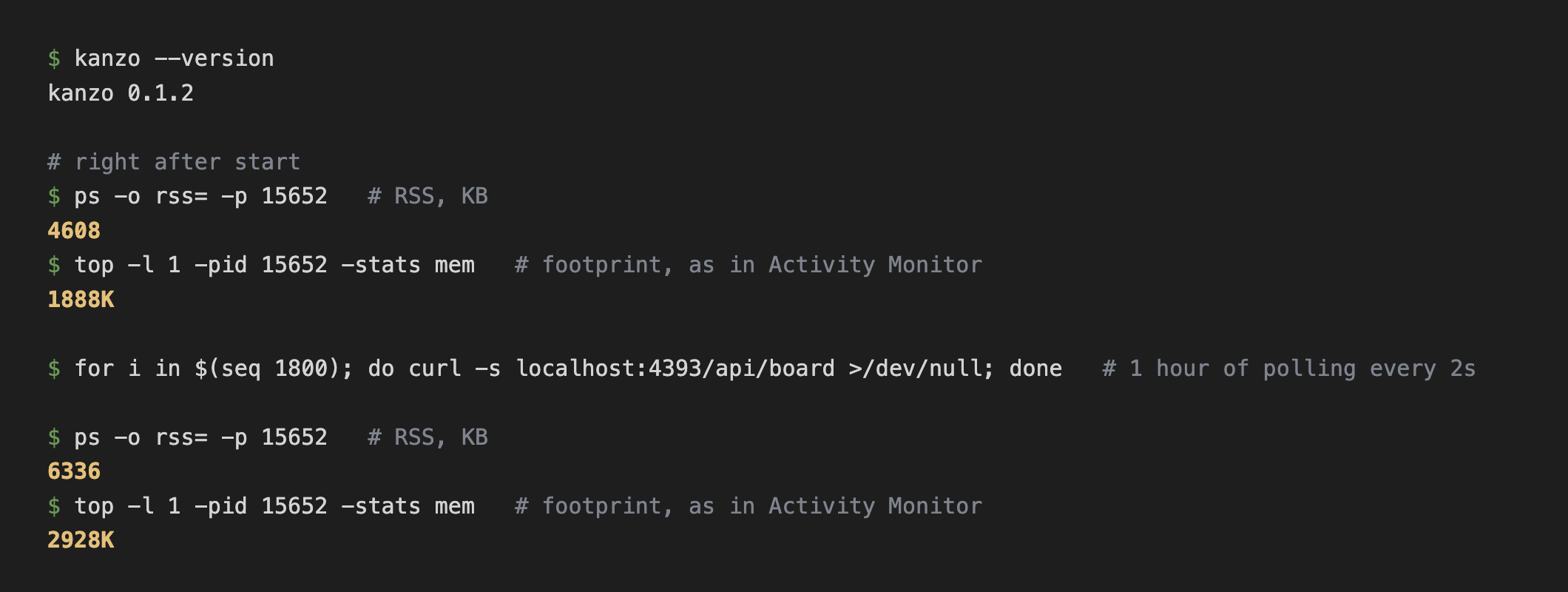
| RSS | Footprint | |
|---|---|---|
| Right after start | 4.6 MB | 1.9 MB |
| After an hour with the board open | 6.3 MB | 2.9 MB |
I kept going for a simulated full day, measuring RSS at 0, 1, 2, 4, 8 and 24 hours: 4.6, 6.3, 6.3, 6.3, 5.8 and 5.8 MB. It rises in the first hour and then stays flat. That's the shape I was hoping for, and the one that matters for something you leave running for weeks. The board on my laptop had been running for six hours with a footprint of 2.9 MB.
Two more data points from the resource work. Idle, Kanzo runs one thread: the runtime is Tokio's single-threaded one, and the helper threads for blocking work exit after a few seconds of quiet. In a Linux ARM64 container limited to 64 MB of RAM and half a CPU, it idled at 3.5 MB RSS. With 3,000 tasks loaded on my Mac, RSS was 7.8 MB and the board's API answered in 2 ms.
The commands, if you want to check your own:
ps -o rss= -p <pid>                 # RSS, in KB
top -l 1 -pid <pid> -stats mem      # footprint, as Activity Monitor shows it
footprint <pid> # footprint, with a breakdownKanzo's process is small, but you look at it through a browser, and a browser tab is never small. I wanted to know what the tab itself costs. For each page, I launched a fresh Chrome, three times, and compared the memory footprint of its renderer processes with the same Chrome showing a blank page. I also recorded what the page downloaded and its JavaScript heap through the DevTools protocol.
| Page | Download | JS heap | DOM nodes | Extra tab memory |
|---|---|---|---|---|
| Kanzo, 40 tasks | 113 KB | 0.8 MB | 668 | about 13 MB |
| Kanzo, 3,000 tasks | 753 KB | 1.8 MB | 21,388 | about 67 MB |
| Kanzo's GitHub page | 2.9 MB | 14.4 MB | 3,309 | about 130 MB |
The page is one HTML file and one JavaScript file with no framework, embedded in the binary. There's no build step and nothing from a CDN. With 3,000 tasks the tab grows, because 3,000 cards are 21,000 DOM nodes. The done column already shows only the newest 50, and that's the lever to pull if this ever matters.
I didn't put this table in the README because comparing with GitHub's page is a joke, not a benchmark. But it's a useful sense of scale: reading about Kanzo costs more than running it.
For an agent, what Kanzo really costs is tokens, and most of them are in the replies. Every tool result stays in the conversation until the session ends or gets compacted, so an agent that checks the board twenty times carries twenty replies. That's the part that grows, and it's where Kanzo is most different from a typical server.
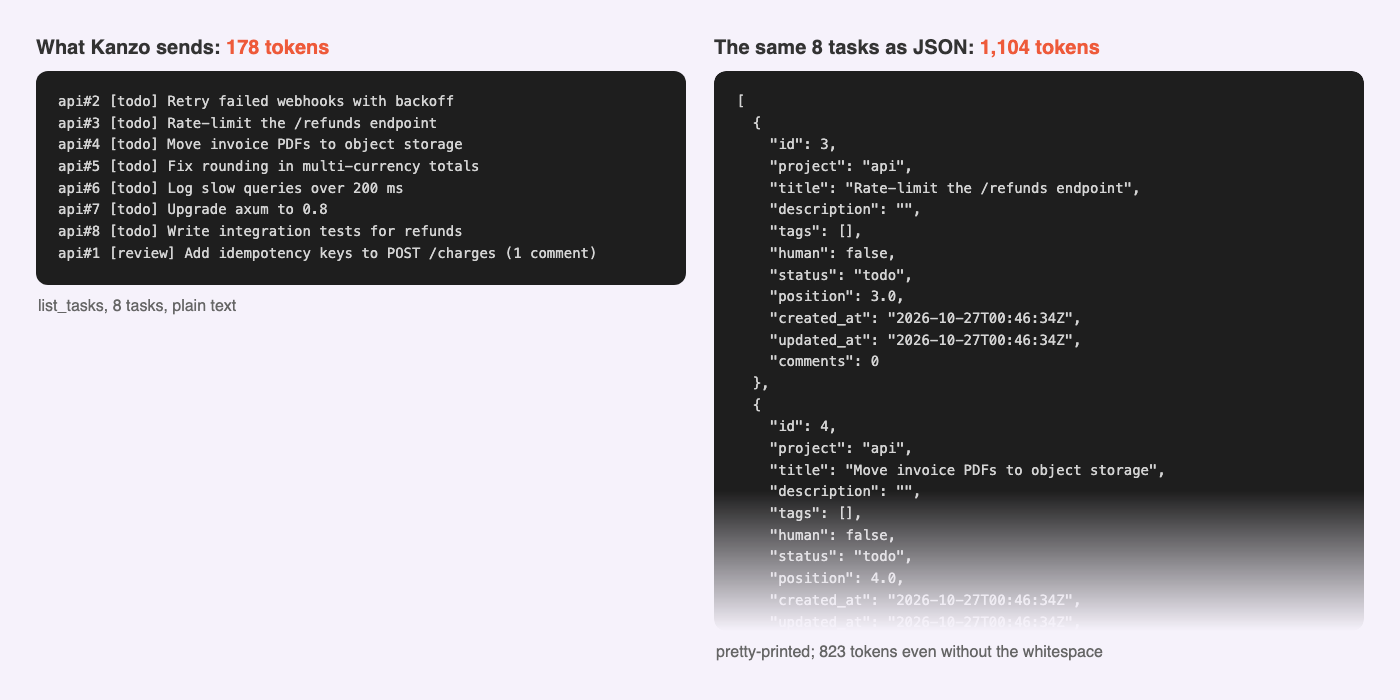
Kanzo answers in plain text, one task per line. I counted with Claude's own tokenizer, by sending each reply to Claude Code and reading the input tokens the API reported. Here are eight tasks as Kanzo returns them, next to the same eight tasks as the JSON its own web API returns:
| Reply | Plain text | Same data as JSON |
|---|---|---|
next_task | 46 tokens | |
get_task, with one comment | 97 tokens | 255 tokens |
list_tasks, 8 tasks | 178 tokens | 823 compact, 1,104 pretty-printed |
Taking a task costs 46 tokens. A list is about 20 tokens per task, four to six times less than the same data as JSON. And the text is easier for the model to read: api#2 [todo] Retry failed webhooks with backoff doesn't need to be parsed, and a field like "position": 3.0, useful to the board and useless to an agent, never reaches it.
The other cost is the tool list itself: the ten tool definitions are just under 1,000 tokens, plus about 90 for the instructions. It's the same on every call, so it's cached after the first one. The system prompt belongs to the client and is the same with or without Kanzo, so that's the fair number to compare between servers.
curl -LsSf https://github.com/emanuele-em/kanzo/releases/latest/download/kanzo-installer.sh | sh
# or
cargo install kanzo

kanzo                                             # opens the board
kanzo service install                             # optional: start the board at login
claude mcp add kanzo --scope user -- kanzo mcp    # Claude Code
codex mcp add kanzo -- kanzo mcp                  # Codex
kanzo service install keeps the board running in the background and starts it when you log in: a LaunchAgent on macOS, a systemd user service on Linux. kanzo service uninstall removes it.
Then ask your agent: "take the next task from kanzo and do it."
The code is on GitHub under the AGPL-3.0: about 3,800 lines of Rust plus one HTML and one JavaScript file. If you try it, I'd like to hear what breaks, and which numbers look different on your machine.